FX Rack
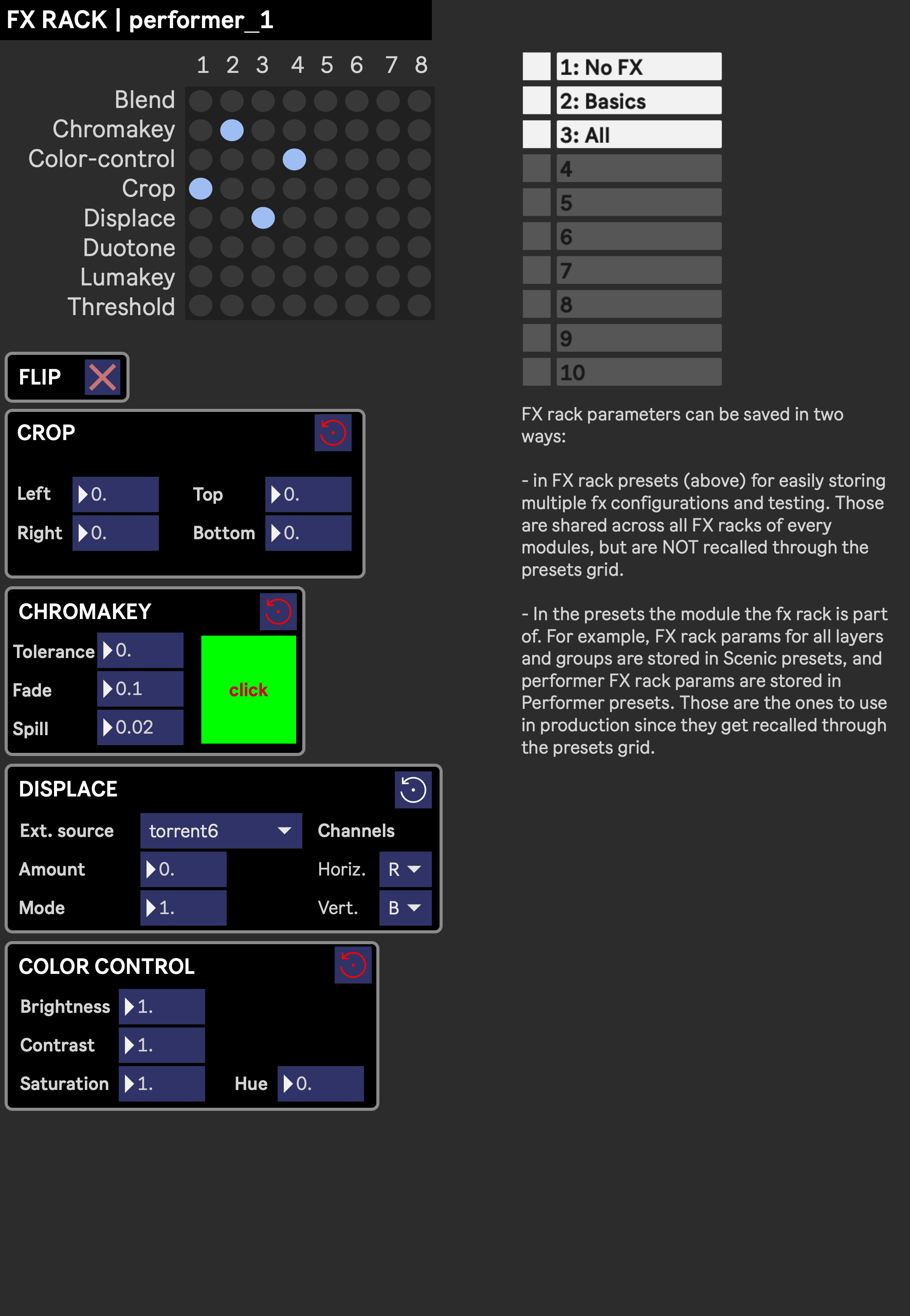
FX Rack is a sub-module added to various modules (Layers, Groups, Performers, maybe more in the future), opened from their respective FX button. It provides a set of video effects that can be enabled, arranged and tweaked at will, and is applied to the parent module’s texture.
The matrix in the upper left corner is used to enable effects and set their processing order, from left to right (column 1 first). In the example above, taken from a Performer’s FX Rack, the enabled effects (blue dots) result in the following chain:
(performer_1 input) > Crop > Chromakey > Displace > Color-Control > (output)
Below the matrix, all enabled effects are displayed as individual panels, in the same order as set in the matrix, the first one at the top and the last one at the bottom. Each panel has its own reset button, next to its title.
The Flip effect has no dedicated row in the matrix: it is always present at the start of the chain, and can be toggled on/off with its own button.
Presets
Section titled “Presets”The numbered slots in the upper right corner are the preset controls for FX Rack presets (see Managing presets for how to recall, save, rename or otherwise organize them from this interface). Each preset stores which effects are enabled, in which order, and all of their parameter values. FX Rack presets have two particularities:
- They are shared across every FX Rack of every module (Layers, Groups, Performers…), making them convenient as starting-point templates.
- They are not recalled through the Presets grid. The effect configuration actually meant to be used live is instead stored in the presets of the FX Rack’s parent module (eg. Scenic presets for Layers and Groups, Performer presets for Performers), so use FX Rack presets only to prepare or test configurations, not to store the ones used in production.
Video effects
Section titled “Video effects”See Video effects for the parameters of each of the following: