Lights
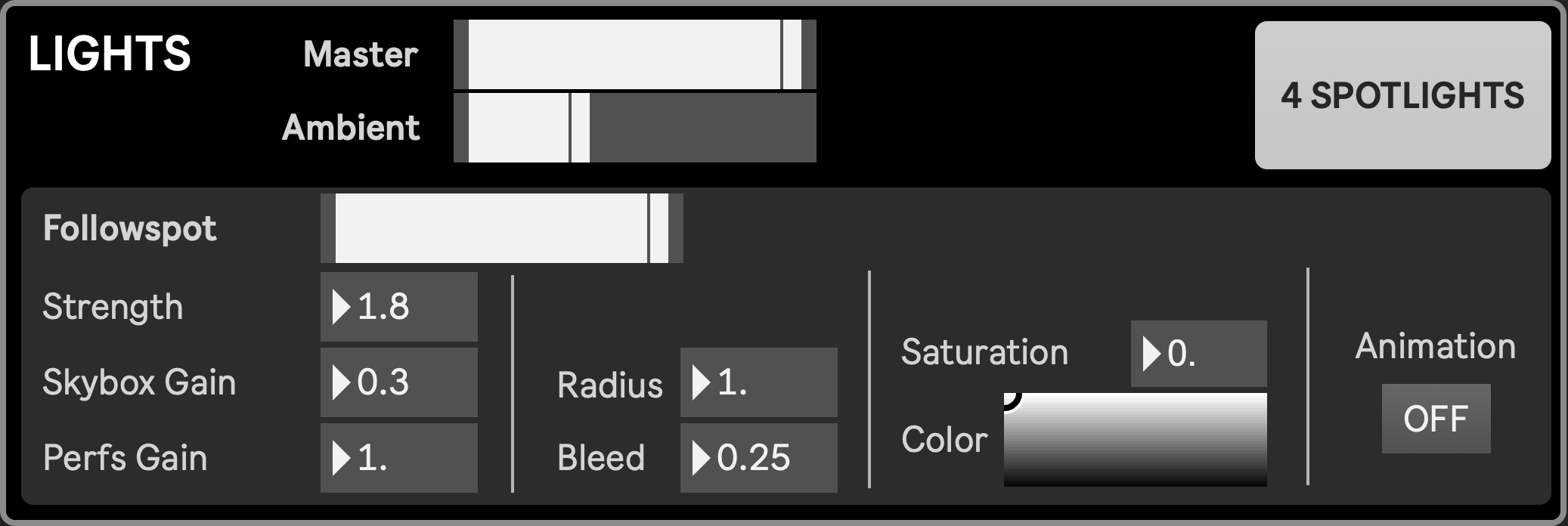
Lighting in the Stage is designed to create expressive visual atmospheres that support the spatial and theatrical dynamics of remote performance. There are three lighting systems:
- ambient light, for evenly distributed luminosity, tinting the scene with the environment maps colors
- followspot, as in classical theaters, bringing the focus on some elements in the scene, also lighting the background (skybox). The followspot is attached to the camera and will always light what is in front of it.
- four individual spotlights, either assigned to performers or freely positioned, for a precise lighting setup
This triple-layered lighting system allows for both immersive realism and theatrical stylization. When ambient light is reduced and individual spotlights are precisely focused, the resulting scene can evoke the emotional intensity of a physical stage, reinforcing the illusion of shared presence in a virtual environment.
While each light has its own strenght/fader, all lights can be dimmed at once through the Master fader.
Ambient light
Section titled “Ambient light”The ambient light illuminates the entire scene evenly. Its quality depends on the selected environment map which will define its tints and reflections on objects. The only ambient light parameter sets its intensity, which fades out the skybox and dims the environment maps reflection on objects.
The way the ambient light is managed internally is currently a bit sketchy,so bringing it down might give mixed results depending on the selected environment map. This is subject to change in the future.
Followspot
Section titled “Followspot”The followspot adds directional focus and can be aimed globally or targeted at specific performer locations, like a classical theater follow-spot, albeit here it always originates from the camera position (through which the audience will see the scene). It includes parameters for strength, intensity, radius, bleed, color and random movements. In addition to lighting the performers and platforms in its ray, it has the particularity to also light the skybox, breaking its infinite nature by giving the illusion of it being a wall behind the performers. Its impact on the perforfers and skybox can be set individually.
- Followspot fader: dimms the followspot while preserving its settings
- Strenght: maximum strenght of the followspot, reached when the fader is all the way up
- Skybox gain: gain of the followspot reaching the skybox. Turn this down to 0 if you want the followspot to only light the performers and platforms, or to 1 if you want it to reach its maximum strenght against the performers.
- Performer gain: gain of the followspot reaching the performers and platforms. Turn this down to 0 if you want the followspot to only light the skybox, or to 1 if you want it to reach its maximum strenght against the skybox.
- Radius: defines the angle of the followspot. The bigger the angle, the more surface the light will cover
- Bleed: defines how blury the lights outline is. Impacts the skybox only.
- Color (Hue, Saturation, Brightness)
- Animation: when turned on, the spotlight randomly scans the scene
Individual spotlights
Section titled “Individual spotlights”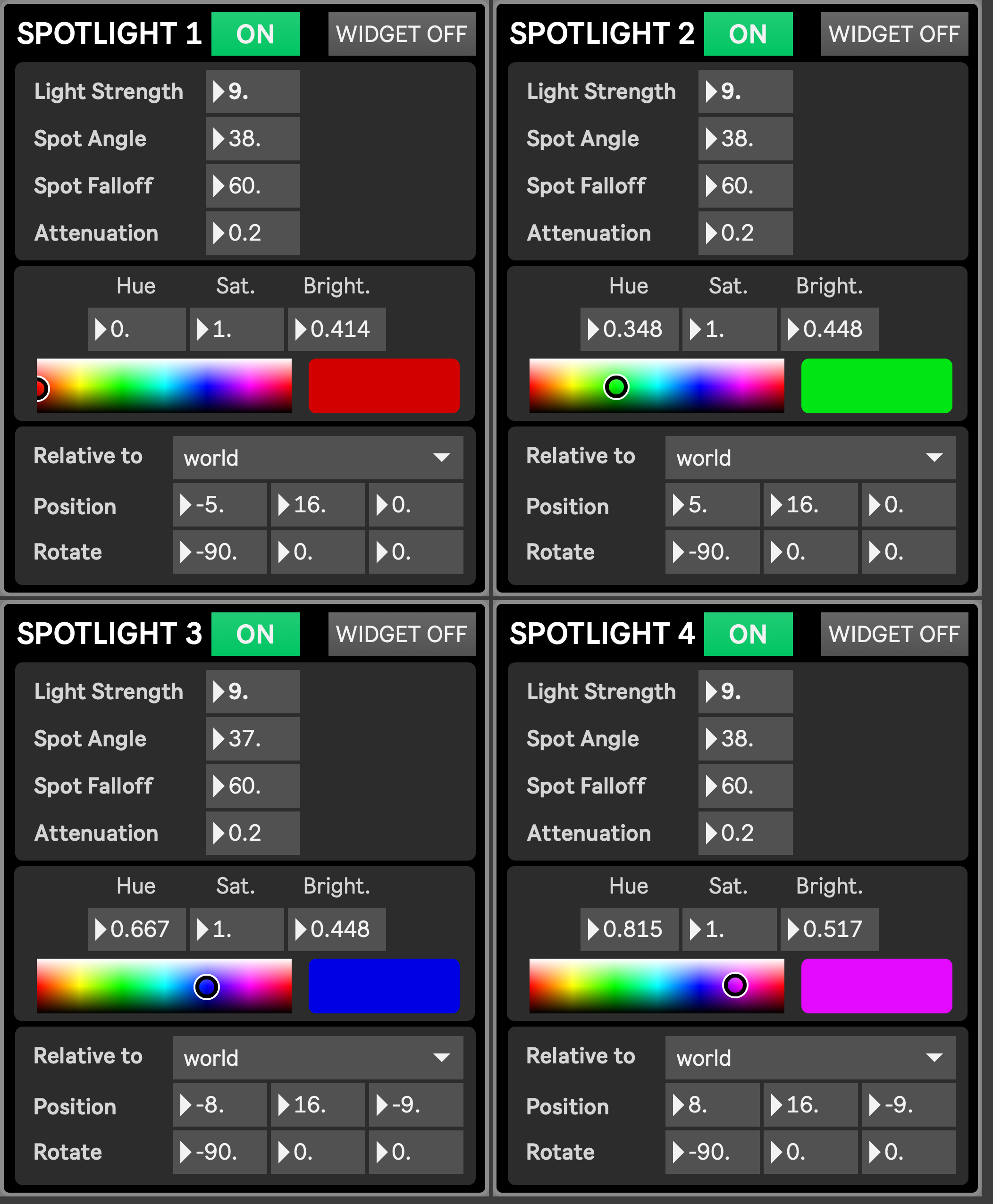
Individual spotlights (up to four) are multipurpose lights, typically assigned to each performer but also usable as more diffuse lights for the entire scene’s mood. Each spotlight features independent control of position and rotation, and can be placed either at an absolute position, or relatively to a performer (effectively following the performer as they move). Controls include spot angle for beam width, falloff for edge softness, attenuation for distance-based intensity, and detailed color and saturation adjustments. A wireframe widget can be toggled on or off to visualize each spotlight’s direction and focus.
The interface for all four spotlights is opened by clicking the “4 spotlights” button in the Lights module.
- On/Off: turns the spotlight on/off
- Widget On/Off: turns widget on/off, allowing to materialize the light source in the scene. This is meant to be used during lights positioning, not during a production
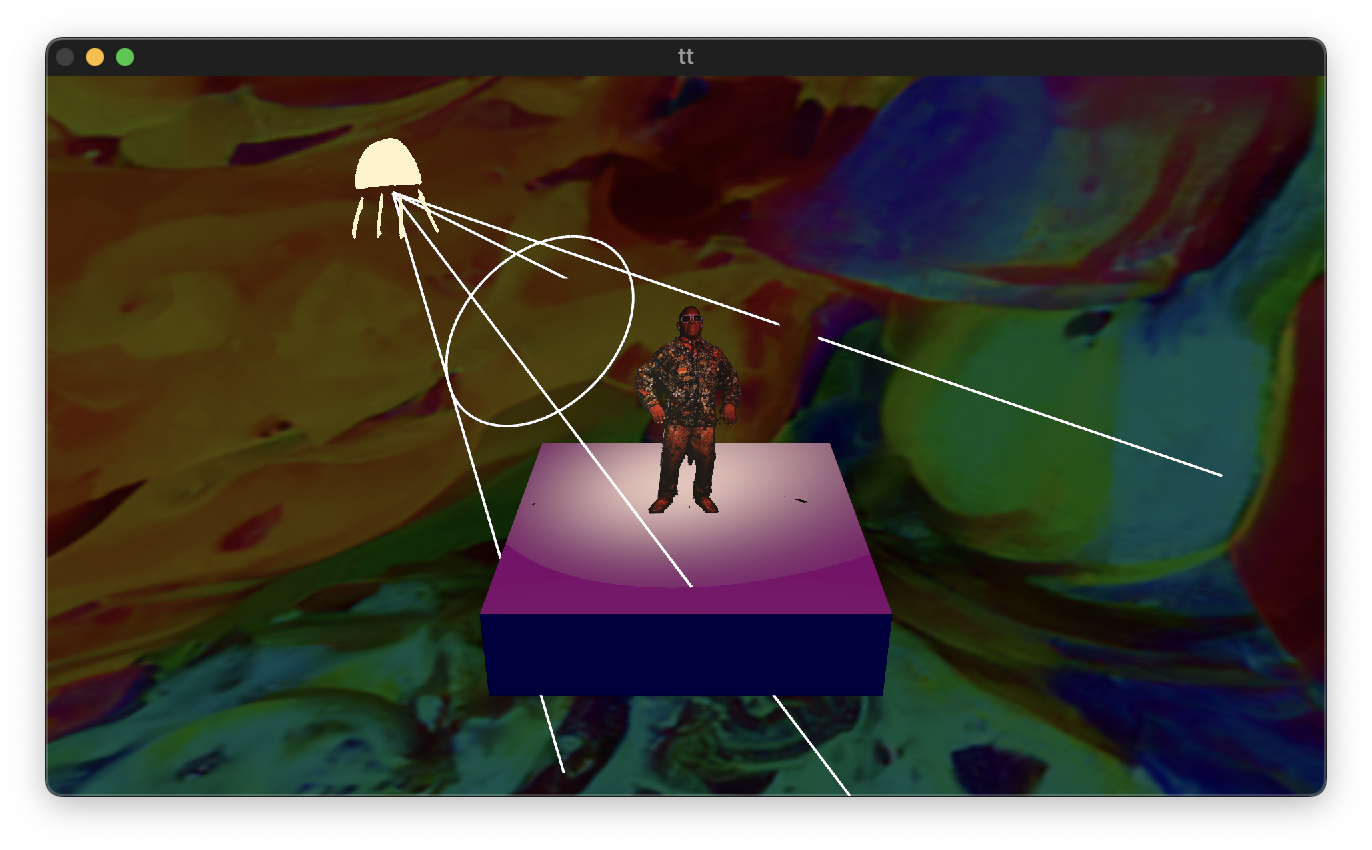
- Light Strength: how intense the light is overall
- Spot Angle: how wide the beam is
- Spot Falloff: how soft/hard the beam’s edge is
- Attenuation: how quickly it fades with distance from the light source
- Color (Hue, Saturation, Brightness)
- Relative To: Sets the object against which the spotlight is positioned. If set to World, the spotlights position is absolute. If set to another object, then the spotlight position is relative to that object, meaning that it will move alongside that object
- Position
- Rotatexyz