MIDI mapping
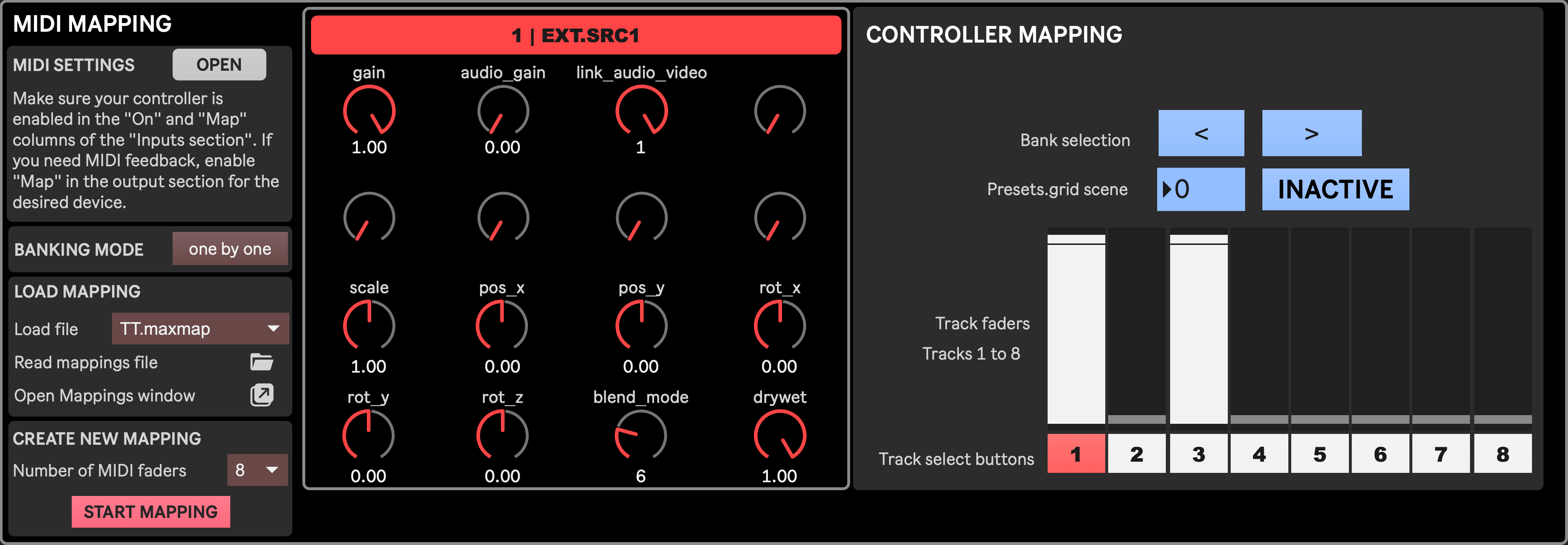
In this section is divided in two parts. The left part is where you can select a mapping file for a given MIDI controller or start creating a new mapping, while the right part shows the Virtual Control module, to which you can map MIDI knobs, with an extended part showing Mixer faders and buttons that can be mapped too.
See MIDI control to learn how to map your MIDI devices to the Visual Stage app.
- Open MIDI settings: open the Max MIDI setup window, allowing to enable/disable MIDI devices connected to your computer. See this page of the official Max documentation for more info.
- Banking Mode: Sets the behavior of the left/right banking buttons available at the botton of the Mixer. “one by one” means that one press to a banking button scrolls themixer by one track, while “by group” scrolls by a number of tracks equivalent to the number of MIDI faders defined below.
- Load file: select which mapping file to use. The file is typically named after the MIDI controller it is supposed to work with. Mapping files are located in
telematic-theater/MIDI/and thus are common to all projects as long as they are opened on the same computer with the same instance of the Visual Stage app. The selected mapping is stored in Setup presets, allowing to easily switch between different mappings/devices alongside different Setup presets corresponding to different production phases. - Read mappings file: opens a dialog allowing to select a mappings file anywhere in your computer. Notice that loading a mapping this way is only temporary
- Open Mappings Window: opens the Max Mappings window, showing all mapped controls for the currently loaded mapping file. This is mostly useful for debugging and monitoring purposes when creating your own mapping.
- Number of MIDI faders: select how many faders your MIDI controller has. This allows to properly bank between all 24 Mixer tracks regardless of the number of physical faders you have.
- Map controls: start the process of creating a new mapping. See MIDI control for more info.