Camera
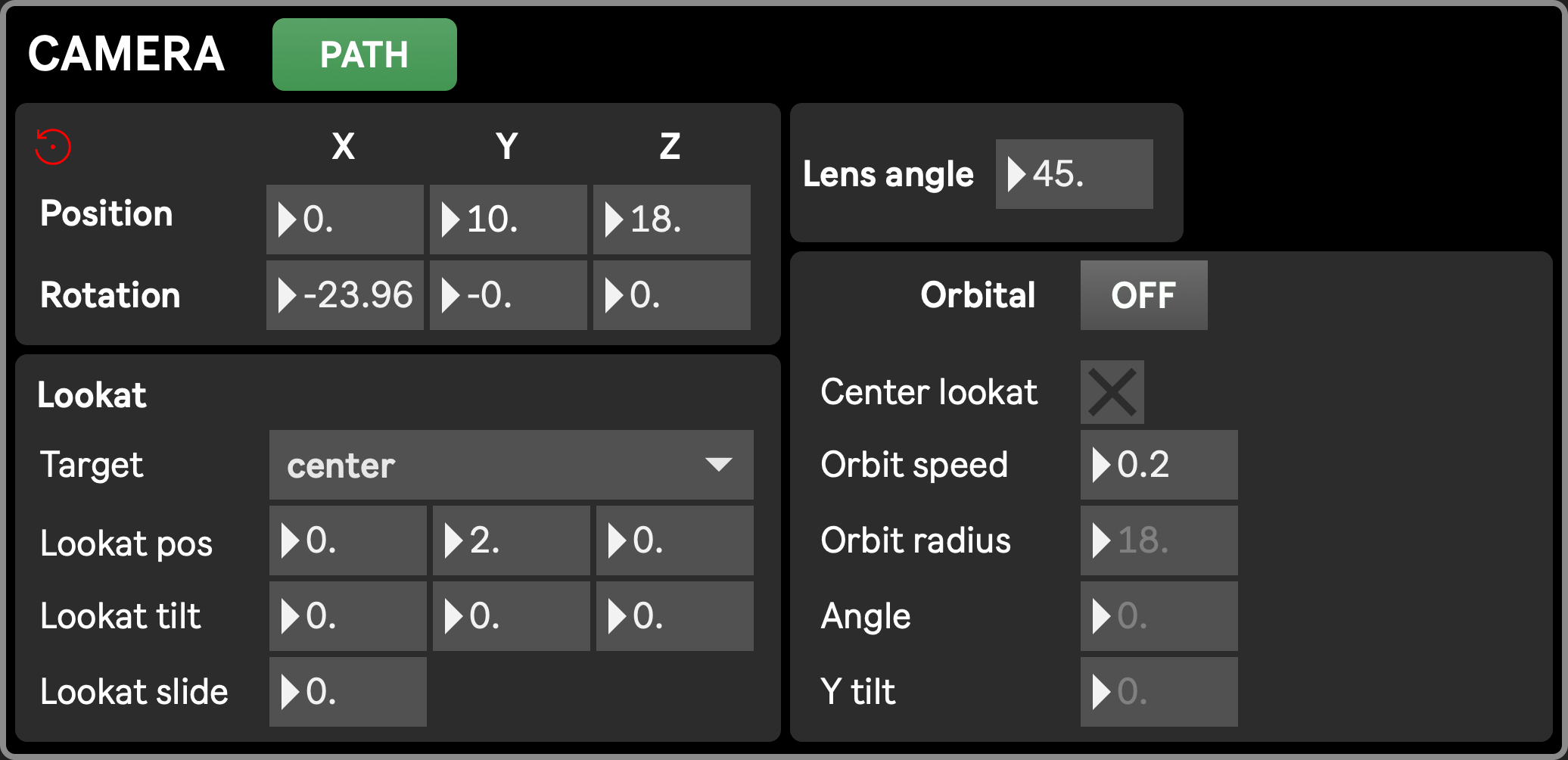
In virtue of the virtual aspect of the Stage, the scene is not necessarily seen from the front as in a classical theater. The virtual camera, representing the point of view of the scene, can be controlled in any aspect, and thus solicits inspiration from cinematography.
It can be controlled and animated in various ways
- Position
- can be controlled:
- by changing the position X Y and Z values directly
- by moving the camera object in the 3D panner
- can be animated:
- by recalling or interpolating Scenic presets with different camera positions
- by enabling Rotation auto, making the camera to move on a circle
- by using Paths
- can be controlled:
- Rotation (tilt, pan, roll)
- can be controlled by changing the rotation X Y and Z values directly
- can be animated:
- by using the lookat parameters, indicating which point in space the camera should be directed toward, regardless of its position.
- by recalling or interpolating Scenic presets with different camera rotations
Common parameters
Section titled “Common parameters”- Position
- Rotation
- Lens angle
Lookat
Section titled “Lookat”The lookat parameters allow the camera to point toward a designated point in space, whether it is a manually defined point, or the position of a performer or platform. When a lookat target is designated, the rotation parameters cannot be changed anymore, as they are driven by the lookat feature.
- Lookat target: defines where the camera should look at. Different options are possible
- Disabled: no target, camera can rotate freely through its rotation X Y Z parameters, other lookat parameters are ignored
- Center: camera looks toward point (0, 2, 0), slightly above the center of the world
- Custom: camera looks toward a custom point in space, set with Lookat position X Y Z parameters
- Performer 1-4 and platform 1-4: camera looks toward one of these objects
- Lookat position X Y Z: position at which the camera is pointing (if Lookat target is enabled). Can be edited or interpolated through Scenic presets only when lookat target is set to custom or center.
- Lookat tilt X Y Z: offset added to the lookat position. This is useful for example if you want the camera to always look toward a moving performer, but without having them in the center of the screen: lookat target has to be set to the performer (that will set the lookat position to the performer position), and lookat tilt must be adjusted to offset the view
- Lookat slide: makes any change in the lookat position progressive, regardless of potential preset interpolation times. The higher the value, the more time it will take to reach the desired target. This is helpfull to easily mimic realist camera movements when changing lookat targets
Orbital
Section titled “Orbital”The Orbital feature drives the camera position on a circular trajectory, allowing for easily doing arc shots, also called circular or orbital shots. When the Orbital feature is enabled, position X and Z cannot be changed anymore, as they are driven by the circular movement.
- Orbital: enable or disable orbital movement
- Center Lookat: when enabled, the rotation movement is centered on the lookat target. This prevents the Camera Y position from being manually changed (as it is partly determined by the targets Y position), but the relative camera elevation can still be adjusted using the Y tilt parameter described below. When disabled, it is centered on the world’s center (coordinates (0,0,0)).
- Orbit speed: radial speed of the movement
- Orbit radius: distance from the center
- Angle: current angle in the rotation
- Y tilt: available only when Center lookat is enabled, allows to move the camera up or down relatively to its center of rotation (either the center of the world or the lookat target if Center lookat is enabled)