Spat room
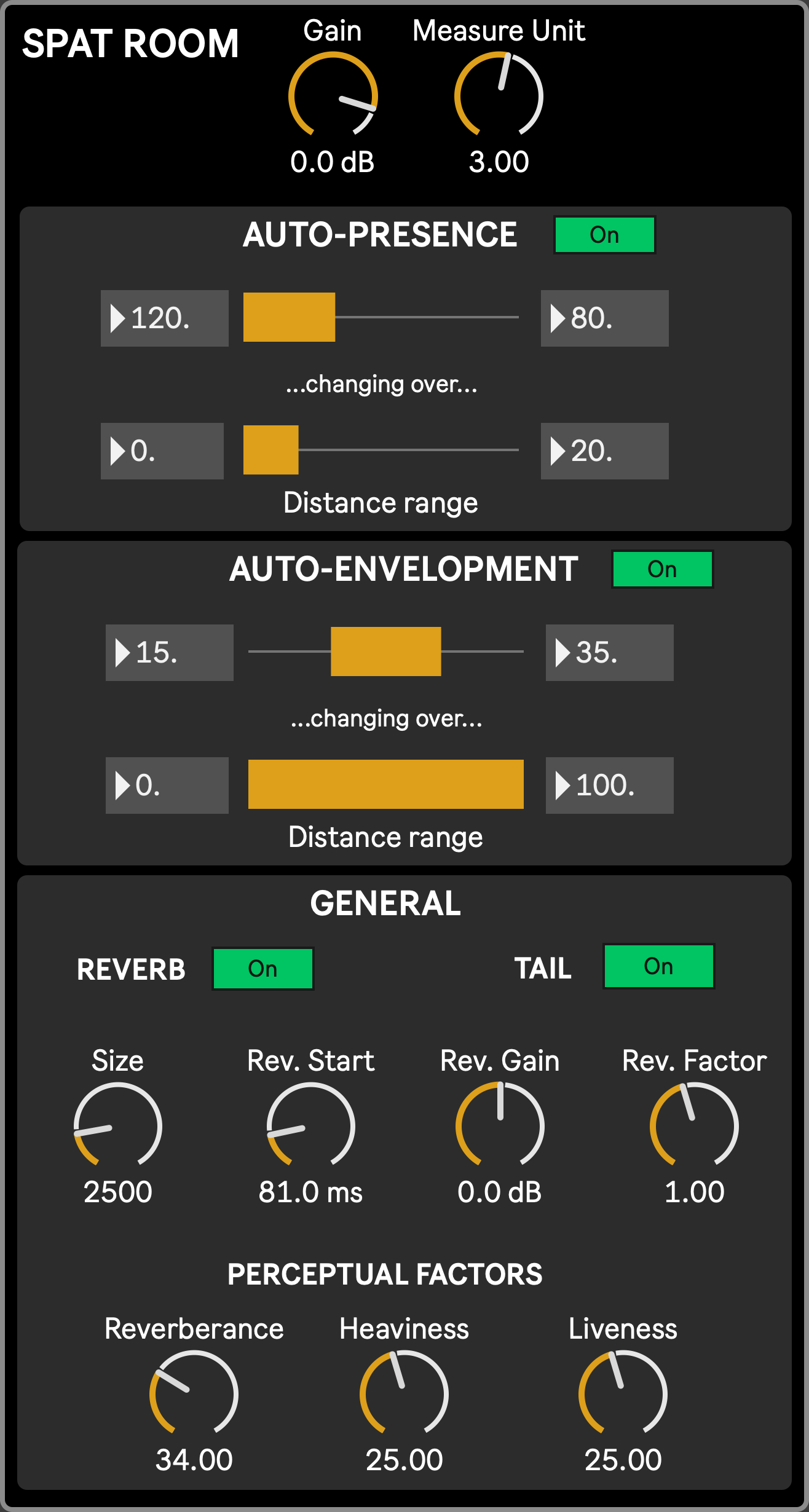
The Spat room module, specific to the stage, allows to set Spat Revolution parameters for the room(s) defined in the SPAT settings, as well as the sources Envelopment and Presence behavior. These parameters define the acoustic response of the Stage’s virtual space. They are saved in the scenic presets and thus can be updated in real time alongside other Scenic parameters, allowing emphasis between audio and visuals.
Parameters that are specific to Spat Revolution (like the Gain and others in the General section) are sent to the software through OSC as per the configuration set in the Network settings.
- Gain: the room output gain in Spat Revolution
- Measure Unit Factor: specific to the Visual Stage app, this is the value by which all computed distances will be multiplied before being sent the Spat Revolution, allowing to scale up or down the entire 3D scene but only for the audio computation, either to emphasis the sense of space given by the scale of visual objects (Performers and platforms), either to slip away from reality and suggest impossible spaces.
- Auto Presence and Auto Envelopment: when enabled, they drive the source’s Presence and Envelopment parameters (see Spat source) according to the distance between the performer and the camera/viewer. This allows to exaggerate the senses of distance or intimacy as the objects move. The first two parameters define the Presence/Envelopment range (minimum and maximum value) that should be covered over a performer-camera distance defined by the two next parameters. For example, an auto-presence set to 120 - 80 with a distance range of 0 20 means that the Performers presence will be set to 80 if the performer is at distance of 20 or higher from the camera, and will start to increase up to 120 when the distance goes below 20 down to 0. Note that ranges for the Presence and Envelopment are inverted. The Presence value will decrease with the distance while the Envelopment value will increase.
- General parameters, all directly sent to Spat Revolution. Most parts of the following parameter descriptions come from the official Spat Revolution documentation:
- Reverb on/off: enable/disable the room’s reverberation
- Tail on/off: enable/disable the reverb’s tail, leaving only the reverb’s short reflection if disabled
- Size: This is a meta-parameter that takes care of several other parameters to quickly set the equivalent size of the virtual room, adjusting early, cluster, and tail reverb parameters to match the room characteristics.
- Reverb start: Reverb start sets the duration between the direct, dry source signal, and the first late reflections, or beginning of the reverb tail.
- Reverb gain: gain of the sound produced by the reverb
- Reverb factor: configure the reverb tail factor
- Perceptual factors
- Reverberance: affects how the listener perceives the music to be prolonged by the reverb when the musical message suddenly stops. The effect of this setting is also apparent when the source material is percussive. Reverberence is tightly related to the overall decay time of mid-frequencies, which is the time the late reflections take to vanish into silence.
- Heaviness: The relative decay time of low-frequency content.
- Liveness: The relative decay time of high-frequency content. Describes the liveliness and movement associated with the reverb tail (late reflections).