Introduction
The Visual Stage app, also referred to as ‘the app’ in the current document, can be thought of as the nerve center of the Telematic Theater Studio. This is where all visual elements, including live feeds from performers, video and image materials, are gathered, arranged, set up and composited. It consists of an application made in the software Max/MSP, by Cycling ‘74, that can be operated from the Primary node for setting everything up, and then controlled locally and/or remotely for running prepared shows.
The Visual Stage app consists of multiple modules that can be roughly categorized in source modules, made to handle and manipulate source materials, and destination modules aimed at compositing the sources with various rendering approaches, from basic 2D layers to more advanced 3D objects.
A certain state of the application can be stored as a Project.
A Project is simply a folder that includes the required assets, such as videos and still images, as well as preset files for storing values of any modified parameter.
The following diagram shows a simplified version of the media flow, from files and external sources to the final, composited image. This can be used as an entry point to explore other parts of the documentation.
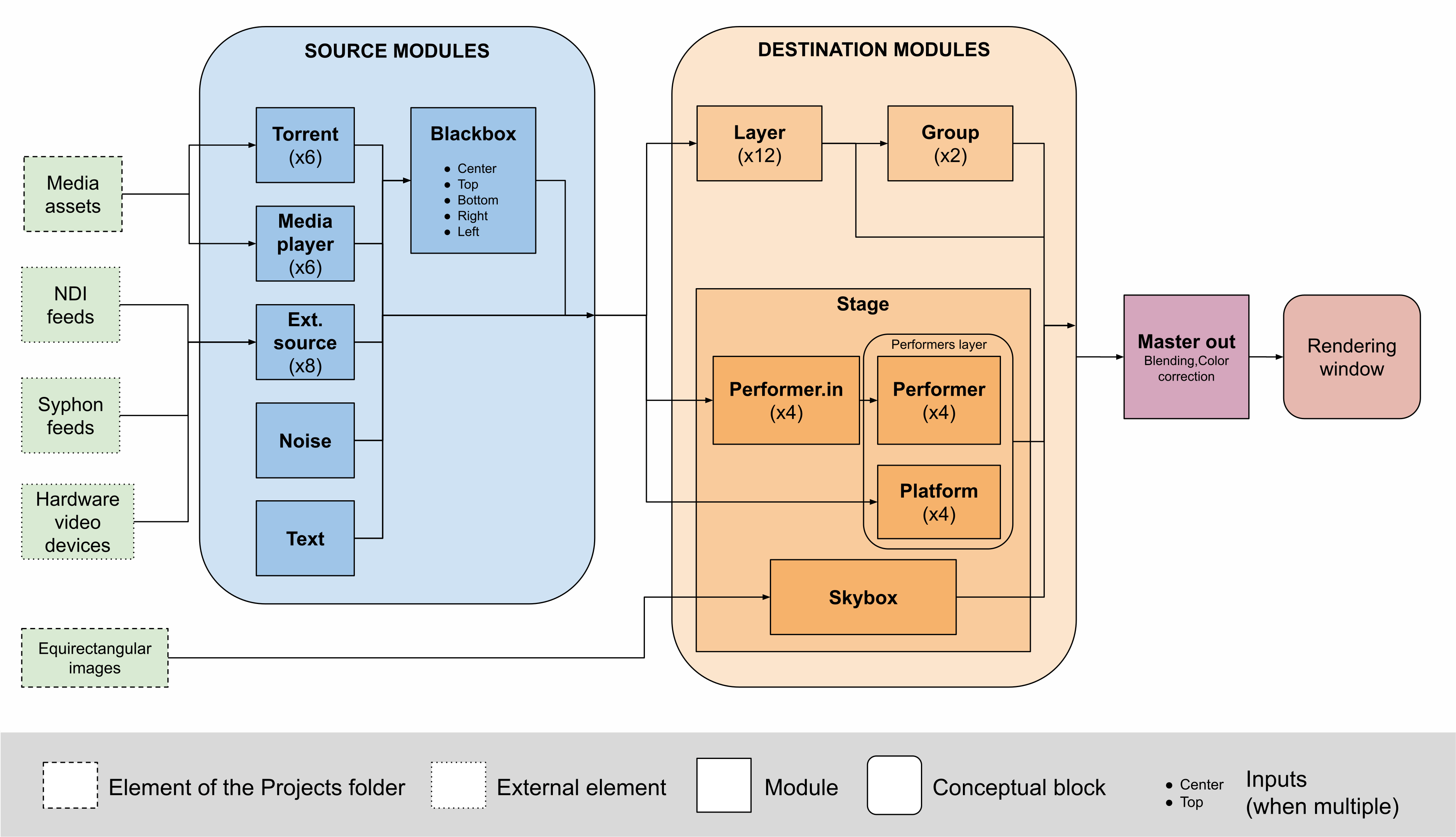
Although not represented in this diagram, the app can perfectly handle audio from various sources and provide either a single summed stereo output or multiple stereo outputs that can be routed to other applications for mixing.