Skybox and environment
Skybox and environments are two intricate parts of the stage, both originating from environment maps, also known as equirectangular maps, ie. image files representing the projection of a sphere on a rectangular surface with a 2:1 ratio. These environment maps can be added to the Project folder in <project name>/stage/equirectangulars and can be in EXR, JPEG or PNG formats. Only one of these images can be used at the same time, and will serve two purposes:
- Skybox: a 360° backdrop to our 3D stage. It is worth noting that the skybox is rendered on its own dedicated layer, whose order number can be set in the Project settings. This way it is possible to place other layers between the skybox and the performers.
- Environment: reflections of that skybox on other objects in our scene (performers and platforms), giving the illusion of a more cohesive overall. The environment in itself has no dedicated module or parameter, it is just the visual reflection of the selected environment map onto performers and platforms.
Skybox module
Section titled “Skybox module”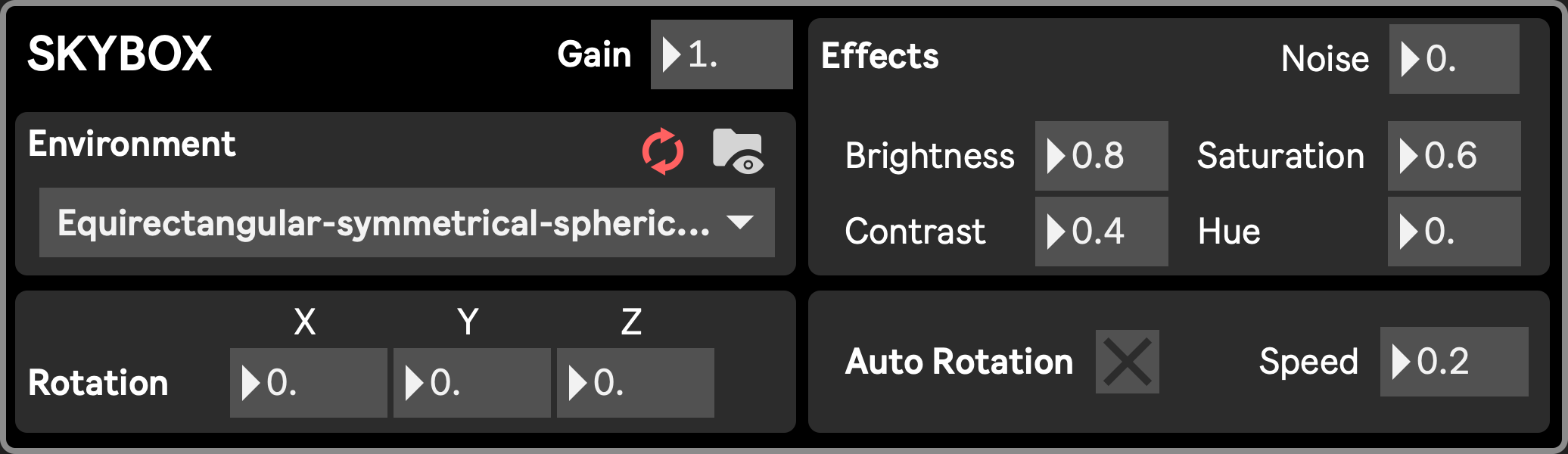
-
Gain (skybox::gain): Fades the skybox layer. At 1, the skybox is fully opaque. With values below 1, the layer becomes transparent, revealing underlying layers.
-
Environment selection (skybox::environment_1) : select a file to be activated as the current skybox and environment
-
Rotation (skybox::(rot_x|rot_y|rot_z)): rotate the skybox
-
Rescan: rescan the current folder (this will cause performance drop, see Limitations)
-
Reveal folder: open the project’s equirectangulars folder in the Finder
-
Effects
- noise: apply displacement based on the Noise module
- brightness
- contrast
- saturation
- hue
-
Auto Rotation: Turns on/off the skybox autorotation along the vertical axis
- Speed: Radial speed of the rotation
Limitations
Section titled “Limitations”
Environment maps are often heavy files (usually a few dozens of megabytes) and take up time to load, causing significant stutter and performance drop during the loading time.
In order to allow for quick changes between skyboxes/environments while avoiding any stutter, all environment map files of a project get pre-loaded when the Project is opened or the Equirectangulars folder rescanned. You might notice that there is a bit of stuffer in the app interface, and also a possible FPS drop when opening a project. This is mostly due to the environment maps being loaded, and it is recommended to wait for the FPS to stabilize - indicating the loading is done - before performing any further action. You can also refer to the Busy indicator which will turn red during the loading of the equirectangular maps and turn off when the process is done.
These map files can take up a lot of memory on the GPU, limiting the available resources for other assets or even, if overloaded, causing a crash.
It is then highly recommended to populate the stage/equirectangular maps of your project folders with only the required images, and any unused material removed.
See Development/Environment loading for more info.